
Добавление подключение через wifi
Step 1: Создать Security Profile
-Click Wireless
-Click Security Profiles
-Click red plus to add new profile
-Type Security Profile Name
-Select Access Point/Router Authentication Type(Encryption method)
-Select Unicast and Group Ciphers
-Type the password of the access point or wireless network and enter it into either the WPA or WPA2 based on the encryption method on the access point. If this is open wifi then leave fields blank.
Step 2: Delete wlan1 Bridge
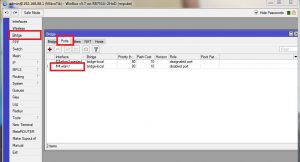
-Click Bridge
-Click Ports Tab
-Right Click on wlan1 and remove
Step 3: Turn DHCP Client to wlan1
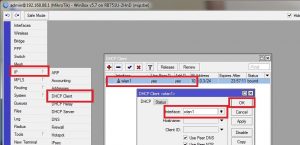
-Click IP
-Click DHCP Client
-Double click wlan1
-Change drop down menu to wlan1
-Click OK
Step 4: Change NAT Out Interface
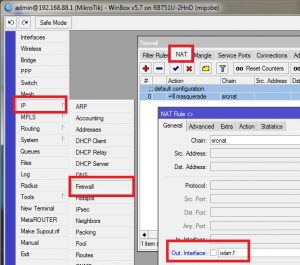
-Click IP
-Click Firewall
-Click NAT Tab
-Change Out Interface to wlan1
Step 5: Change MikroTik to Station Mode
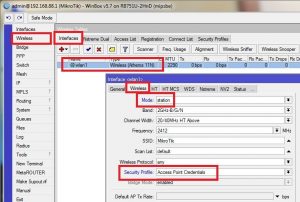
-Click Wireless
-Double click on wlan1
-Click the Wireless tab
-Change drop down menu Mode to station
-Change Drop Down menu Security Profile to the Security Profile Entered in step 1
Step 6: Perform Scan
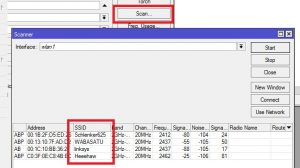
-Click Scan
-Double Click the SSID of the Network you are connecting to.